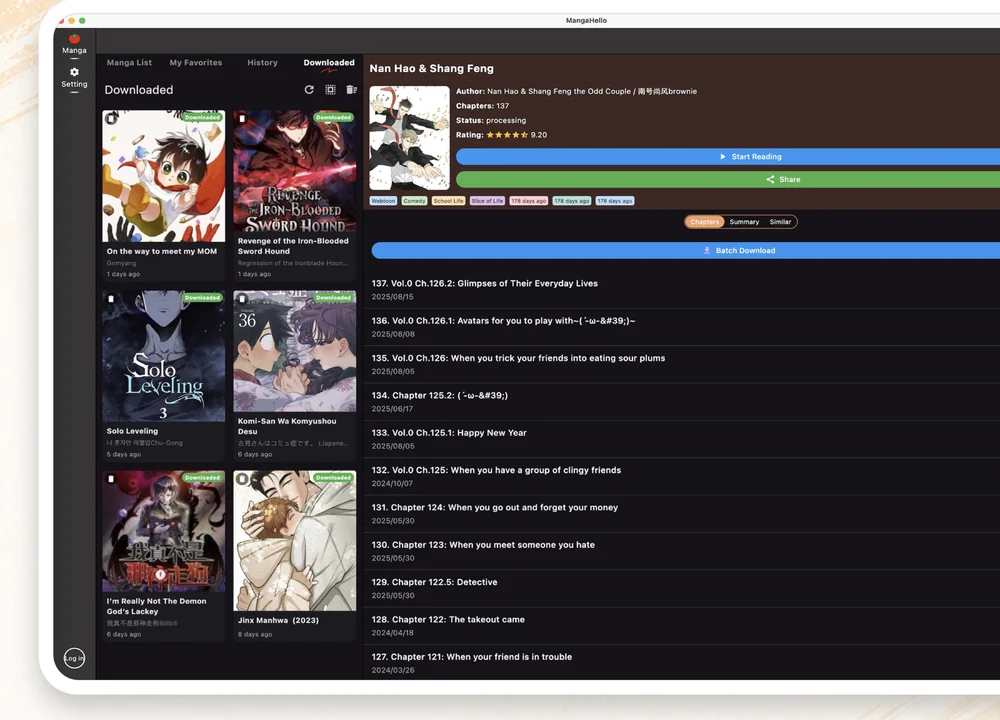
A manga library becomes difficult to manage when discoveries, current reads, completed series, and offline chapters all live in the same mental list. A simple system makes it easier to return to the right chapter, prepare reading before a trip, and remove downloads you no longer need.
This guide uses the library areas available in MangaHello—manga lists, favorites, reading history, and downloaded titles—to build a practical routine. Menu names can vary slightly by platform or app version, but the organization method stays the same.
Decide what belongs in your library
Start by separating titles according to what you plan to do next. You do not need a complicated tagging system. Four clear states are enough for most readers:
- Discover: titles you may want to read later.
- Reading: series you are actively following.
- Paused: titles you want to keep but are not reading now.
- Offline: chapters already saved for a period without a reliable connection.
Use the main manga list for discovery, favorites for the smaller set you want to keep, history for recent progress, and downloads for files stored on the device. This keeps each screen tied to one decision instead of turning every screen into another copy of the same long list.
Use favorites as a short reading queue
Favorites work best when they answer one question: “What do I want to continue?” If every interesting title becomes a favorite, the list stops being useful.
When you discover a series, preview its description and available chapters before adding it. Keep active and high-priority titles in favorites. Remove a title when you finish it, pause it for a long time, or decide not to continue. A shorter favorites list is faster to scan and easier to maintain.
Let reading history recover your place
Reading history is useful for recently opened titles, especially when you switch between several series. Before starting a new chapter, check whether the history entry matches the chapter you last completed.
This small check helps prevent accidental skips and repeated reading. It is also useful after moving between devices or returning to a series after a break. Treat history as a recent activity trail, not as permanent storage for every title you have ever opened.
Prepare an offline reading set
Build a small offline set before travel, commuting, or entering an area with unreliable service. Download only the chapters you realistically expect to read during that period.
Check storage before downloading
Open your device storage settings and confirm that enough space is available. Image-heavy chapters can add up quickly, and the device still needs free space for normal app and system activity.
Save a focused chapter range
Choose a limited range around your current reading position. A focused set is easier to verify and remove than a large archive. After the download finishes, open the downloaded section and confirm that the expected title and chapters appear.
Test one chapter while offline
Before leaving a reliable connection, briefly disable network access and open one saved chapter. This verifies that the chapter is actually available locally instead of only appearing in a recent list.
Only download manga you are authorized to access. Respect publisher rights, platform terms, and the rules that apply in your location.
Review downloads after each reading period
Offline storage should be temporary unless you have a clear reason to keep a title. After a trip or reading session:
- Finish or note your current chapter.
- Remove chapters you no longer need offline.
- Keep the title in favorites if you plan to continue.
- Confirm that enough free space remains for the next download set.
This review prevents old chapters from silently consuming storage and keeps the downloaded view focused on what is actually available to read next.
Use a weekly five-minute cleanup
Once a week, open favorites, history, and downloads in that order. Remove titles you no longer plan to read, use history to recover any forgotten progress, and clear completed offline chapters.
The goal is not to create a perfect archive. It is to make the next reading decision obvious. A short, regular cleanup is more sustainable than reorganizing hundreds of entries after the library has already become difficult to navigate.
Keep the routine simple
A reliable manga library needs only a few habits: save promising titles selectively, use history to recover progress, download a focused chapter set, verify it offline, and clear finished files. MangaHello brings those library views together so the system can remain simple across discovery, reading, and offline preparation.